Size = the socket's measured OUTSIDE diameter
(calipers across its widest part - a "13 mm" socket is usually 17-18 mm
outside). Label = the number engraved next to the pocket, usually
the printed size. A new line appears as you fill the last one.
Move row anchors the row's CENTRE - gaps and added/removed
sockets grow the row evenly around it.
Anything not listed?
Just type it - your answer is kept as typed. Not sure? Pick
Mixed or Unknown - every field plus the socket count is
needed before the measurement fields open.
TESTING phase: this data comes from factory specs and community
measurements - check every measurement and the finished tray
for accuracy before printing. ESPECIALLY check sockets with a
large diameter difference between the top and bottom - their
pocket fit depends on which end you store downward.
Row 1
Gaps0
Move rowauto
Row length0
End biasauto
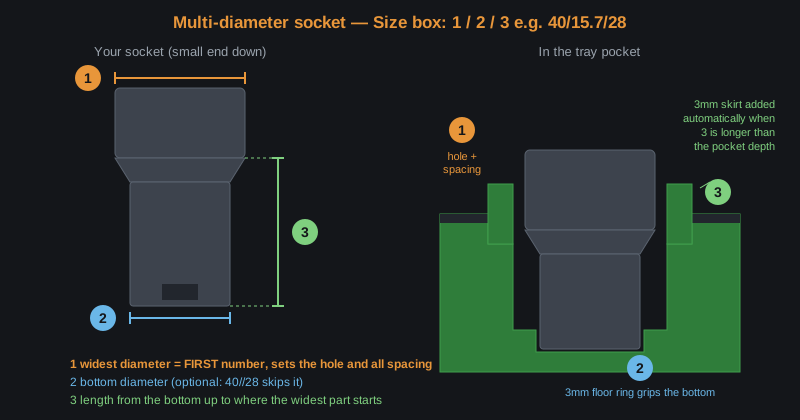
Always enter the socket's WIDEST diameter
— it sets the spacing — and insert that end into
the pocket. Not the same diameter end to end? Tick
Multi-diameter socket (TESTING phase) for Bottom and Length
columns — only the widest diameter is required.
See measuring diagram
Always enter the socket's WIDEST diameter
— it sets the spacing — and insert that end into
the pocket. Not the same diameter end to end? Tick
Multi-diameter socket (TESTING phase) for Bottom and Length
columns — only the widest diameter is required.
See measuring diagram
Always enter the socket's WIDEST diameter
— it sets the spacing — and insert that end into
the pocket. Not the same diameter end to end? Tick
Multi-diameter socket (TESTING phase) for Bottom and Length
columns — only the widest diameter is required.
See measuring diagram
Always enter the socket's WIDEST diameter
— it sets the spacing — and insert that end into
the pocket. Not the same diameter end to end? Tick
Multi-diameter socket (TESTING phase) for Bottom and Length
columns — only the widest diameter is required.
See measuring diagram
Always enter the socket's WIDEST diameter
— it sets the spacing — and insert that end into
the pocket. Not the same diameter end to end? Tick
Multi-diameter socket (TESTING phase) for Bottom and Length
columns — only the widest diameter is required.
See measuring diagram
Always enter the socket's WIDEST diameter
— it sets the spacing — and insert that end into
the pocket. Not the same diameter end to end? Tick
Multi-diameter socket (TESTING phase) for Bottom and Length
columns — only the widest diameter is required.
See measuring diagram
Socket magnets can increase total tray height, and magnet fit
depends on your printer's tolerances - fit is NOT assured.
Every Gridfinity foot also gets a 6 x 2 mm base magnet pocket
automatically.
page v01.09-17:47 -
Your design is remembered on this device automatically;
Save design downloads it as a small file you can reload later
(or on another device) with Load design. Reset starts
fresh from the example design (Undo brings your old design back);
Undo/Redo step through your changes.
Preview updates as you type. Drag = rotate, wheel = zoom,
right-drag = pan. Oversize trays download as a ZIP of dovetailed pieces -
print each file on its own plate and drop them together in order
(A, then B, then C...). Every foot has a 6x2mm magnet press-fit pocket.
enter sockets to preview
Set
⚠ Dovetail joints not possible without changing your
layout
This tray is too big for one plate, but the gaps between your
sockets leave no room for a joint where a cut is needed.
Changing the layout
uses the same two per-row controls you have: first the Gaps are
widened evenly (on multi-row trays only the rows that block the
cut are aligned for the split), then the holes are moved (Move
row), and if still needed one 21 mm section is added with
the sockets re-spread evenly. The result states exactly what
was applied, in mm.